Showing posts with label textual coordination. Show all posts

Saturday, December 03, 2005

Wiki as Personal CMS?

This Ask Ars installment features a question about using a wiki as a personal content management system (the discussion offers myriad solutions). The writer, who lives in a house with four roommates, asks about using one to manage mundane tasks:
We’ve all decided that a wiki would be an efficient way to communicate information to everyone in the house. For example, when is the water bill due? Check the wiki. Who do we contact about the trash pickup which never seems to come? Check the wiki.

This life-hack question reminds me of Cheryl Geisler's research into the use of technologies for managing home-life (here and here). It's my home-life texts that I have the most trouble tracking (especially due to nearly annual moves). Electronic banking and bill-pay has cut down on the negative effects of this, but remember how complicated it can be with multiple roommates.

Thursday, October 27, 2005

Gettin' ILL


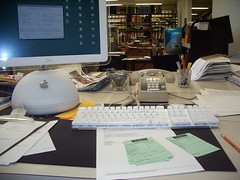
my desk
Originally uploaded by elevatedprimate.
InterLibrary Loan requests... textual coordination for a text that's not where you want it!

I can empathize with Elevatedprimate. I've spent this month requesting books from every corner of Illinois.

Tuesday, August 30, 2005

Co-locating Text as Life-Hack

Giles Turnbull over at O'reilly describes his attempt to "organise all my work, all my personal stuff, all my writing, in one huge text file?" -- the most extensive attempt at textual coordination I've heard to date. Read his post and the 43 Folders post that told me of the attempt to learn more about the rationale and pros and cons of the approach.

Monday, May 23, 2005

Automated textual coordination 1.0

Mostly, this is an excuse to play with a neat online toy, "Spell with flickr", by Kastner. But it also shows that by executing rules for coordinating texts, scripts can automate some processes that would take quite a bit of time to do by hand.

T square up closeEXt

[Actually, I had to hand-paste the auto-generated HTML because Blogger wont allow Kastner's java. But it's still pretty nifty.]

Friday, May 20, 2005

Taking Notes


Taking Notes
Originally uploaded by
philgyford.

This blog serves as a sort of zoo where I can collect specimines of writing phenomena related to my research. Today's exhibit is a wonderful example of textual co-location and remediation found in the wild.

Phil Gyford has posted this Flickr image of his life-hack/notetaking system. He's got a carfully managed process of taking Post-It notes while reading, then transposing them to the web so that he (and others!) might use them.

Wednesday, April 13, 2005

Textual coordination 1.6: Planning for later use

43 Folders has a post about Anne "Bird by Bird" Lamott’s writerly practice of carrying index cards at all times. I'm fascinated by the idea that we must "capture" our ideas in the moment to prevent their slipping away and that by having them on index cards, we can "use" them later. I'm even more interested to know how many of these cards, once written on, actually get used. I stage a lot of information just in case I might ever need it again. But often don't.

Friday, April 01, 2005

Textual coordination 1.6: Pdfs

The nice thing about electronic journals is their instantaneity. I'm able to get hold of much of the literature I need at a moment's notice. And I can download it as a .pdf. Now, I've got a bunch of reading to do on the rhetorical concept of techne.

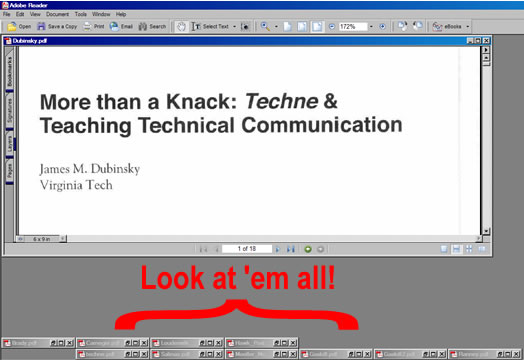
Because I've only got a cheap printer at home, I'm having a go at doing all my reading and note-taking on-screen. There's a reason for this. I'm trying to eliminate the double process of my old work process (read and annotate printed documents, then sit in front of the computer with them and "type up" my notes") and go directly to note-taking in the target environment -- digital -- essentially enabling me to "write" sections of my dissertation by copy/pasting from my copious notes. I've even gone so far as to write my notes in "sentence" form, so they may be more easily assembled:
Dubinsky argues that "knowing how" is a reflective and contingent kind of rhetorical knowledge that differs from "knowing 'how to'" (131).

One difficulty I've run into is managing my document views. The actions I need to perform (reading several articles in a particular sequence and moving back and forth between articles to compare points) aren't easy given a limited screen size and clunky way of moving amongst several documents. I've got four down, seven to go. We'll see how long this madness lasts.

Not the easiest way to coordinate texts. Posted by Hello

Monday, March 21, 2005

Textual Coordination 1.5: Splitscreen

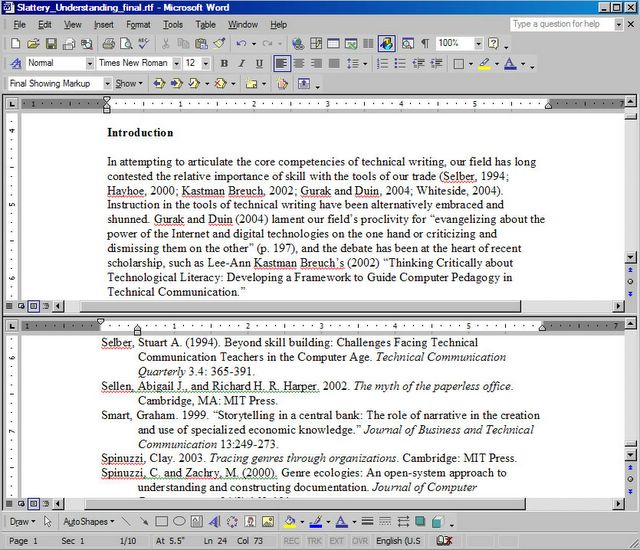
Recently, while writing the document pictured below, I needed to simultaneously view the introduction (which contained several academic citations) with the works cited list, to recall who was arguing what. I'd forgotten about this functionality in Word, but you can split the screen to view two portions of the document simultaneously -- formerly impossible with digital documents and a major affordance of print over on-screen reading.

But I'd been using Excel a lot recently, and I remembered that split screen was available in Word too. So here's an image of splitscreen textual coordination in action.


Coordinating on-screen texts with splitscreen funtionality Posted by Hello

By the way, to do this, you grab a little tiny bar over on the scroll bar and drag it to where you want to create the split. You can then scroll each part of the document independently. Nifty!


How to split zee screen -- grab and drag. Posted by Hello

Finally, I found myself wanting to do the exact same thing in Adobe Acrobat while reading a .pdf. No such luck. The functionality hasn't migrated beyond MS programs to my knowledge.

Saturday, March 19, 2005

Textual Coordination 1.4: Clay Coordinates

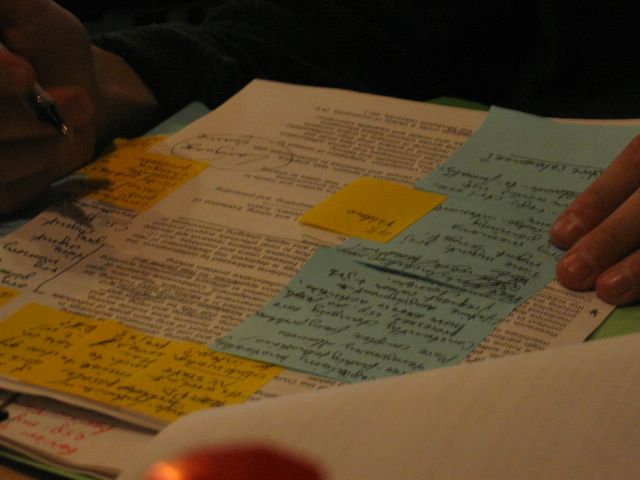
Here's UT's Clay Spinuzzi demonstrating a highly sophisticated annotation system the night before ATTW 2005. Note the use of two meaningfully different colors of Post-It Notes. (Well, meaningful to him at least.) This shouldn't come as a surprise; Clay's very aware of his own literate processes (see also: his "Encomium on Sticky Notes").


Clay Spinuzzi coordinates text, oh yeah!Posted by Hello


A coordinating madman. Posted by Hello

Thursday, March 10, 2005

Prototype for expanded screen view

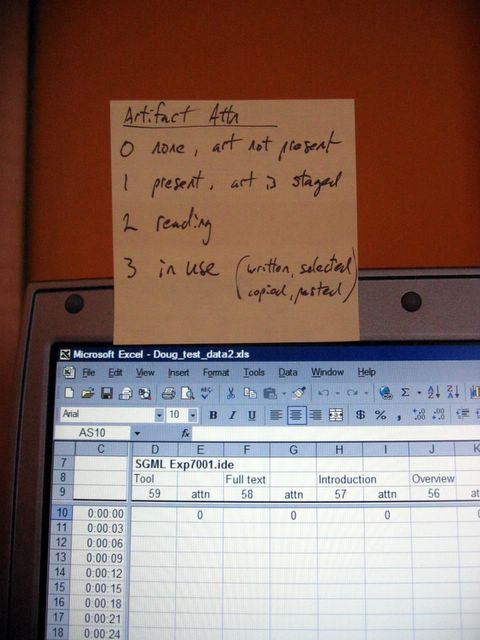
Ran into a display limitation while coding my dissertation data -- needed to see my data, timescale, column entries, AND coding scheme at the same time. But I overcame that with a little-a T.C. (textual coordination). See, I told you Excel bites.


Ran outta screen room! Posted by Hello

Wednesday, March 09, 2005

Research -- Snow Crash Style

Just read the coolest passage from Neal Stephenson's Snow Crash. In best cyber-punk fashion, Stephenson describes "goggling in" to the Metaverse, a VR/avatar-based version of the Internet. The main character, Hiro Protagonist (heh), wanders into the Library and stumbles upon a friend's research project:
The room is filled with a three-dimensional constellation of hypercards [think document avatar], hanging weightlessly in the air. It looks like a high-speed photograph of a blizzard in progress. In some places, the hypercards are placed in precise geometric patterns, like atoms in a crystal. In other places, whole stacks of them are clumped together. Drifts of them have accumulated in the corners, as though Lagos tossed them away when he was finished. Hiro finds that his avatar can walk right through the hypercards without disturbing the arrangement. It is, in fact, the three-dimensional counterpart of a messy desktop, all the trash still remaining wherever Lagos left it. The cloud of hypercards extends to every corner of the50-by-50-foot space, and from floor level all the way up to about eight feet, which is about as high as Lagos's avatar could reach.
This is how I would like to organize my dissertation data.
Excel bites.

Mediating Chicago

So on my recent job interview trip to Chicago, I wanted to get a good look around to see some spots my wife and I might consider living. The goal was to scout out neighborhoods and take some pictures so that she might see what they looked like.

Someone was kind enough to drive me around and tell me about the area. Here's the tricky part. When you take a picture, how do you know where on the map it was taken? I tried a few approaches:
  1. Make a numbered note on the map that corresponds to the picture taken.
  2. Take a picture, then take another picture of road signs nearby to help pinpointing later.
  3. Make short videos of the areas and say the name of where you are.

I tried each of these as they occurred to me -- experimental mediation on the fly! The third worked best. Here's a photo I accidentally snapped as I juggled all my artifacts.


Mediating Chicago! Posted by Hello

Thursday, February 17, 2005

Wired Courtrooms

Lawyers and judges need to coordinate texts too. This month's Wired includes "For Verdict, Click Here," a description of the technologically-enhanced Ninth Judicial Circuit Court of Florida. (http://www.Ninja9.org/ -- I swear that's their real URL)

Built-in handhelds for lawyers (from Wired.com) Posted by Hello

Monday, February 07, 2005


Uncoordinated text! Posted by Hello

[Update: Sorry... broken link.]

Text Coord 1.3

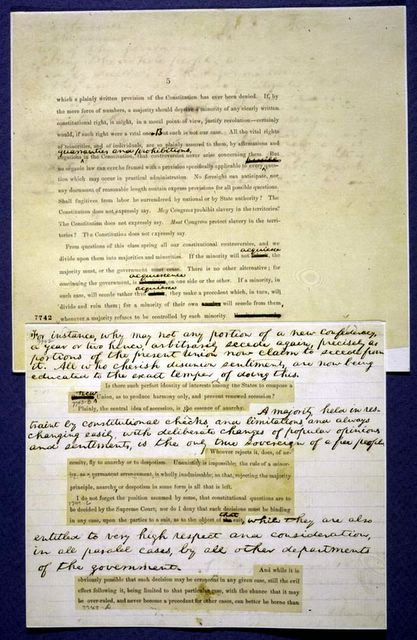
Cutting and pasting to co-locate text for coordination -- the way Lincoln used to do it. (From the Library of Congress page on Lincoln's First Inaugural Address.)

The original cut and paste. Posted by Hello

Saturday, February 05, 2005

Textual Coordination 1.2

Here's a rather famous case of annotation -- the drafting of the Declaration of Independence. For a long time, we've found this process useful:
  1. Create draft (text 1)
  2. Annotate (text 2) to guide...
  3. future revision (text 3)
  4. repeat as needed

Rough draft of the Declaration of Independence Posted by Hello

This image comes from the Library of Congress website. Check out the images of the correction flap in the up and down position. Annotation = textual co-location.

(Notice there are far fewer revisions to the draft of the Gettysburg Address. It's so much harder to write by committee!)

Friday, February 04, 2005

Textual Coordination 1.0

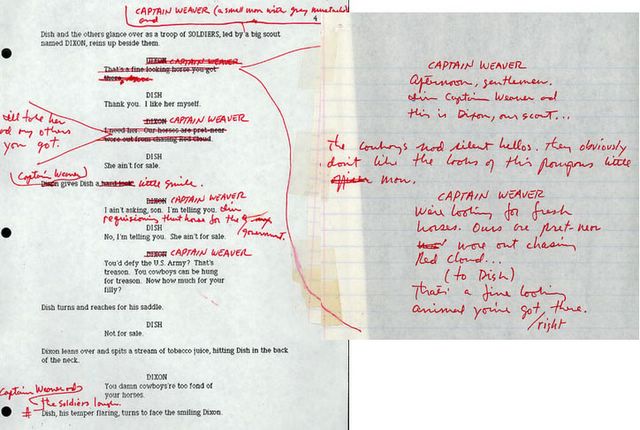
One way we coordinate texts, especially ones produced at different times, is to place them physically near each other. This image from a site about producing the Lonseome Dove movie shows two different modes of annotation that are very familiar.


Annotation: 1 kind of coordination Posted by Hello