Showing posts with label mediation. Show all posts

Tuesday, October 07, 2008

A word for that

Thanks to AWAD, I now know there's a word for the back-borrowing of design features. Their entry puts it best:

skeuomorph

PRONUNCIATION:
(SKYOO-uh-morf)

MEANING:
noun: A design feature copied from a similar artifact in another material, even when not functionally necessary. For example, the click sound of a shutter in an analog camera that is now reproduced in a digital camera by playing a sound clip.

ETYMOLOGY:
From Greek skeuos (vessel, implement) + -morph (form).

NOTES:
A skeuomorph can be employed for various purposes. Since people are used to the click sound of a camera as feedback that the picture has been taken, it is now artificially-produced in digital cameras. Other examples are copper cladding on a zinc penny (for familiarity) and wood finish on a plastic product (for a more expensive look).
As a word nerd, I particularly dig the etymology, but the W'pedia entry gives a more thorough description and several other examples.

I enjoy the tension between utility and familiarity. Sometimes the skeuomorph is superfluous, merely decorative -- a designerly harkening back to the design that informed it. Other times, there's a usability component -- the copper coat on a zinc penny, while not technically necessary, would seem to prevent a lot of errors. And I know some users who find it helpful to hear their digital camera "click".

And I am SO going to incorporate a skeuomorphs-hunt activity in my New Media Studies classes! If you think of any, please comment.

Friday, January 13, 2006

On writing together

Earlier this month the New York Times reviewed Aquamind's NoteShare. Fallows does a good job pinpointing the crux of the difficulty of computer supported cooperative work (CSCW) -- simple interface usually means limited functionality while robustness usually means the need for an entire IT department. NoteShare sounds like a comfy balance. Looking forward to the PC version later this year. I'm getting tired of emailing documents and creating Yahoo groups for every conference panel proposal I'm on.

While asynchronous collaboration certainly works for most academic work, there are often times early in the process (identifying the unifying theme of several projects) and late in the process (close-editing of collaboratively-written documents) when synchronous collaboration would be nice.

I seldom sit down at a computer with another person, but in co-authoring an article with Jason Swarts when I was in Raleigh last year, we'd meet in a coffee shop with a laptop and pass it back and forth. Extreme writing, as it were. I found the process extremely rewarding. One of my main concerns about teaching composition is that by having students writing in isolation all the time, they can develop bad habits or at least never see other ways of writing that they themselves might benefit from. They develop a mere knack when learning a craft is the goal.

Wednesday, January 04, 2006

Happy Birthday Louis Braille

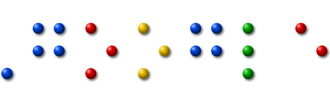
Google honors Louis Braille, the inventor of a system of writing for the blind and visually impaired based on raised dots. The braille system represents a wonderful early example of accessibility well ahead of its time. Here's a great image of someone reading braille. In looking at images of braille, I've noticed that there are different modes of presenting it. This image shows raised-dot-only text. This, however, shows ink on the dots which might help different readers. And this image shows traditional writing printed with the braille text. Finally, there are numerous devices which output digital text into braille. (You can see one in action in one of my favorite movies, Sneakers.)

[image from Google]

Saturday, December 03, 2005

Wiki as Personal CMS?

This Ask Ars installment features a question about using a wiki as a personal content management system (the discussion offers myriad solutions). The writer, who lives in a house with four roommates, asks about using one to manage mundane tasks:
We’ve all decided that a wiki would be an efficient way to communicate information to everyone in the house. For example, when is the water bill due? Check the wiki. Who do we contact about the trash pickup which never seems to come? Check the wiki.

This life-hack question reminds me of Cheryl Geisler's research into the use of technologies for managing home-life (here and here). It's my home-life texts that I have the most trouble tracking (especially due to nearly annual moves). Electronic banking and bill-pay has cut down on the negative effects of this, but remember how complicated it can be with multiple roommates.

Saturday, November 26, 2005

Leapfrog Fly Pen/Computer: Friend or Foe?

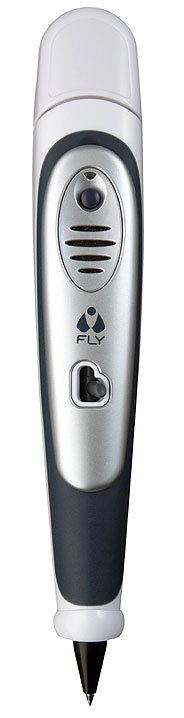
One of the most-touted kid-gifts this holiday season is Leapfrog’s FLY Pentop Computer (warning: slow, flash-heavy, chatty, youth-oriented website). In short, it’s a pen-based PDA with standard functionality (music, calendar, calculator, notepad, etc.), geared toward tweens, as opposed to Logitech’s io2 Digital Writing System (designtechnica review).

The FLY pen allows you to interact with your writing… you can draw a calculator, drum pad, date & time, etc. on special paper and interact with it. Actually, the concept is pretty cool – being able to draw a calculator and then use it – but I’m not convinced how useful it is to have to draw one’s tools every time one wants to use them.

Fly’s functionality is well described in this article from BusinessWeek Online. And it’s been featured in The New York Times [subscription required] and Gizmodo (twice). But the most interesting critique has come from Kristen Kidder of Bitch Magazine (“feminist response to pop culture” and a damn good read) about a functionality I’m particularly interested in: computerized interlocutor as aid to invention. To prompt journal-writing, the pen has pre-recorded questions it can ask. In theory, this is an excellent idea. Conversation (even in the form of leading questions) is a good way to prompt writing. It’s why all grade-school reading is followed by “discussion questions”. But the questions that are posed and how they are phrased can speak volumes, as Kidder reveals:

LeapFrog Enterprises, leading U.S, manufacturer of educational toys and longtime enthusiast of gender stereotypes, is poised to extend their reign this fall with the launch of Fly... Fly's accessories fall sharply along the boy/girl divide. The most notable program is the female-oriented Dear Me Diary (recently renamed the Fly journal), an interactive notebook full of more than 600 writing prompts designed to excite girls about writing and self-expression. The concept is simple: With just a touch of the pen, preteens suffering from writer's block can trigger questions designed to stimulate their creative impulses. A good idea, no? Sure, but there's a catch: A good portion of the topic suggestions reinforce the misconception that all middle-¬school-age female friendships are cemented through the sharing of petty gossip. “Ooh—dish alert! What's going on?” and “What are you so jealous about?” are just two examples of the questions designed to get Fly girls thinking.

I'm all for promoting female self-expression (and what writer doesn’t need a little inspiration from time to time?). I just wish LeapFrog was able to deliver it without aggressively channeling their inner mean girl. – Kristen Kidder
[“Poison Pen” November, p. 21]

I’ve come to see that one potential benefit of technology is using it to prompt social interaction. For example, what if, when creating a resume in MS Word, the task pane included a link, “Chat about this document with a buddy”? As a writing teacher, I’d be pleased as punch if technology suggested social interaction that should happen to improve the document or writing process, but when enacted in the social-norming ways Kidder describes, maybe those girls would be better off with traditional paper and pen and a real friend.

[Image from NY Times]

Thursday, November 17, 2005

Someone keeps moving my tools!

Previews of the new Office 12 interface are available [see here and here] as is C-net's video review. While I understand this process is how we got from here to here, I still get tired of having to learn where particular functionality has been moved. Can you imagine typing if, every few years, the keyboard developers decided to swap and add new keys? How's a guy supposed to develop operational fluency?

Anyway, here's the new "ribbon" interface.


[via Digg,
image from xBetas@PDC05, oh and title adapted from "Someone keeps stealing my letters..."]

Thursday, November 10, 2005

Text. Coord. in popular fiction

Just finished reading, and enjoying, Erik Larson's Devil in the White City -- mandatory reading on Chicago's El (I see at least one person a week with it on the train). Besides being interesting historical non-fiction covering the drama of architects preparing for the 1893 World's Fair and a Category 5 mad-doctor/serial killer, there were two fun examples of textual coordination that caught my eye...

1) A wonderful example of textual intervention -- the strategic placement of text for changing action -- by the Fair's chief architect:
As a reminder to himself and anyone who visited his office in the shanty, Burnham posted a sign over his desk bearing a single word: RUSH. (121)
I know just how that feels.

2) In describing his research process in the book's notes, the author writes:
I do not employ researchers, nor did I conduct any primary research using the Internet. I need physical contact with my sources, and there's only one way to get it. To me every trip to a library or archive is like a small detective story. There are always little moments on such trips when the past flares to life, like a match in the darkness. On one visit to the Chicago Historical Society, I found the actual notes that Prendergast sent to Alfred Trude. I saw how deeply the pencil dug into the paper. (396)
Larson includes this finding in the book itself -- a kind of detail made impossible through Internet research. But Larson seems to pooh pooh an increasingly valuable resource (Google Print post coming soon). While I will be the first to agree with the limits of any particular technology, I get a little annoyed when technologies are written off uncritically and wholesale.

Monday, November 07, 2005

When not to automate

One value of IT is that it can automate the more mundane, operational-level tasks of textual coordination. Where would I be without Copy/Paste? But there are occasions when it is beneficial to do things “by hand”.

Case in point -- this anecdote from today's 43 Folders post, “Productivity for the Practicing Musician”.
Personally, I don’t like automatic syncing between devices — it’s brain-dead. Manually transferring the information at least once allows it to tickle my brain a bit and stimulate new ideas. It’s sync with a built-in review.

Not only do I like the pithy descriptor “brain dead” but the awareness the writer has for the effect of the choice of processes on the activity. This is what I hope to teach my students.

Saturday, October 15, 2005

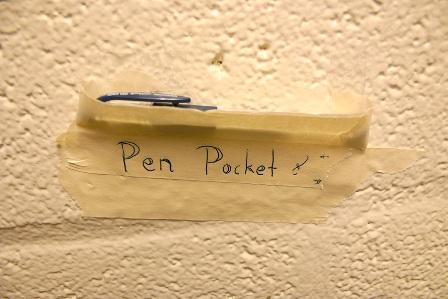
Put the tools where you need 'em...

While looking for images of pens, I found this ingenious hack...

[From Wake Forest U.]

Friday, September 23, 2005

Tracking your own changes

I'm fascinated by people's writing processes and how they strategically mediate those processes. Here's a wonderful anecdote from Jenny's comment to Jason Swarts' interesting post on particle vs. stream views of text:
I even use Track Changes myself when writing a paper. I like to have the original draft embedded in even my sixth or seventh draft, since it is in essence the same document, just with lots of different colors.

In a sense, using Track Changes enables me to develop my thoughts more thoroughly and clearly. And days later, when I'm reading and re-working the paper again, I don't have to wonder where a thought was coming from. My entire thought process is right there embedded in the text. It doesn't seem static to me because I can see how things developed from my initial ideas.
[via: Coherent Fragments]

Tracking your mediated life

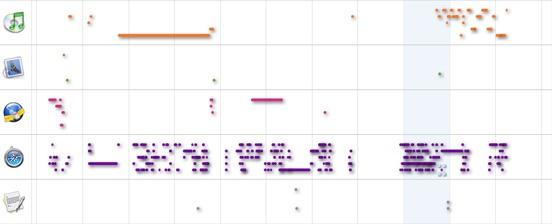
Bill Hart-Davidson pointed me to Onlife, a new Mac-based software use tracking program.
[Onlife] observes your every interaction with software applications... and then creates a personal shoebox of all the web pages you visit, emails you read, documents you write and much more... then indexes the contents of your shoebox, makes it searchable and displays all the interactions between you and your favorite apps over time.
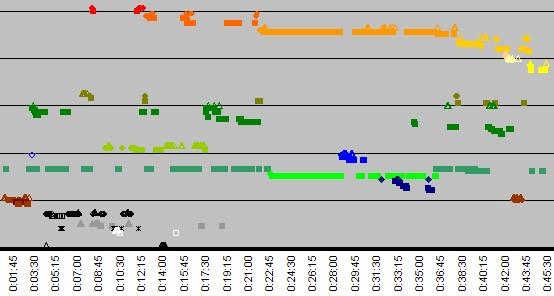
The idea isn't too far off from this project (from Bill, Clay Spinuzzi, and Mark Zachary), which seeks to reveal patterns of communication among people rather than an individual user's patterns of software use. And Onlife's visualization displays look quite similar to my own research data charts of writers' object use over time:


So naturally, just as I mis-used screen-capture software, I'm interested in Onlife as another possible tool for researching writing. ;-)

Tuesday, August 30, 2005

Co-locating Text as Life-Hack

Giles Turnbull over at O'reilly describes his attempt to "organise all my work, all my personal stuff, all my writing, in one huge text file?" -- the most extensive attempt at textual coordination I've heard to date. Read his post and the 43 Folders post that told me of the attempt to learn more about the rationale and pros and cons of the approach.

Friday, August 26, 2005

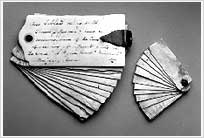
"The great-great-grandfather of the Hipster PDA"

43 Folders links to a blurb about life-hacking forefather Thomas Jefferson's portable note-taking device.


Jefferson's hipster PDA [from monticello.org] Posted by Picasa

Speaking in Ignorance (of Audience and Context)

I now know how my students feel. In my field, student writing is often criticized for being poorly thought out. I believe bad communication is more the fault of ignorance about the situation in which it will be used. And students, through the mere fault of being young and inexperienced, are often ignorant of the contexts in which writing occurs. This happened to me yesterday with my voicemail.

I'm a brand-new faculty member at DePaul University. Yesterday, I tried to set up my voice mail. It's been years since I had a real job, let alone voicemail; and setting it up is quite different from setting up one's answering machine at home. It was the task of making three separate recordings that put me in my students' place.

  1. record your name
  2. record a message for external calls (coming from outside of DePaul)
  3. record a message for internal calls (coming from within DePaul)

The problem was, other than #1, I had no idea how these recordings *ought* to differ, because it's been so long since I used or experienced voicemail in this way, that I had no idea of audience expectations or contexts. I had to *guess* what would be useful for these two different audiences. And I don't know when my recorded name gets invoked either. So here were my best guesses:

  1. "Shaun Slattery" (I had the option of also stating the extension number. I decided against it, but don't know if that was a good or bad decision.)
  2. "This is Shaun Slattery at DePaul University; I can't take your call right now. Please leave a message and I'll get back to you."
  3. "This is Shaun Slattery in the Department of English. Please leave a message and I'll call you back."

Are these sufficiently distinguished for internal and external calls? Do they provide information useful to those two audiences? No. Idea. Whatsoever.

Monday, May 23, 2005

Healthy Technological Criticism

In his recent post "The right tool for the job", Jason Fried over at Signal vs. Noise shows the kind of critical thinking about technology that I'm hoping to teach my students. He does a great job ackowledging that any technology is only one of several possible solutions for a given situation and it's that situation or context that should drive one's choice of technologies.

Amen Jason!

Friday, May 20, 2005

Taking Notes


Taking Notes
Originally uploaded by
philgyford.

This blog serves as a sort of zoo where I can collect specimines of writing phenomena related to my research. Today's exhibit is a wonderful example of textual co-location and remediation found in the wild.

Phil Gyford has posted this Flickr image of his life-hack/notetaking system. He's got a carfully managed process of taking Post-It notes while reading, then transposing them to the web so that he (and others!) might use them.

Saturday, April 23, 2005

Autopen and the distant hand of authorship

This somewhat recent Talk of the Town from the New Yorker raises some interesting questions about what happens when a writer is physically removed from the writing he or she is doing. I find it facinating that, despite Margaret Atwood's argument, remote signing doesn't feel the same.

Even more intersting, to me at least, is how similar Autopen looks to Thomas Jefferson's polygraph machine. Really, I guess its just a matter of scale as to how removed the writer is from writing on each machine. La plus ca change...

DAMILIC Corporation's Autopen [from damilic.com]
Posted by Hello


Jefferson's polygraph [from monticello.org] Posted by Hello

Also mentioned in the Talk piece, LeapFrog’s FLY pentop computer and Margaret Atwood's tragically named Unotchit "gizmo".

Wednesday, April 13, 2005

Textual coordination 1.6: Planning for later use

43 Folders has a post about Anne "Bird by Bird" Lamott’s writerly practice of carrying index cards at all times. I'm fascinated by the idea that we must "capture" our ideas in the moment to prevent their slipping away and that by having them on index cards, we can "use" them later. I'm even more interested to know how many of these cards, once written on, actually get used. I stage a lot of information just in case I might ever need it again. But often don't.

Friday, April 01, 2005

Textual coordination 1.6: Pdfs

The nice thing about electronic journals is their instantaneity. I'm able to get hold of much of the literature I need at a moment's notice. And I can download it as a .pdf. Now, I've got a bunch of reading to do on the rhetorical concept of techne.

Because I've only got a cheap printer at home, I'm having a go at doing all my reading and note-taking on-screen. There's a reason for this. I'm trying to eliminate the double process of my old work process (read and annotate printed documents, then sit in front of the computer with them and "type up" my notes") and go directly to note-taking in the target environment -- digital -- essentially enabling me to "write" sections of my dissertation by copy/pasting from my copious notes. I've even gone so far as to write my notes in "sentence" form, so they may be more easily assembled:
Dubinsky argues that "knowing how" is a reflective and contingent kind of rhetorical knowledge that differs from "knowing 'how to'" (131).

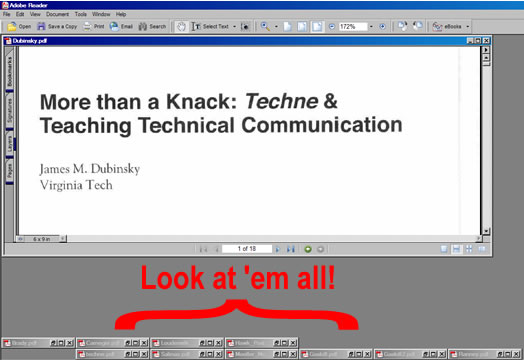
One difficulty I've run into is managing my document views. The actions I need to perform (reading several articles in a particular sequence and moving back and forth between articles to compare points) aren't easy given a limited screen size and clunky way of moving amongst several documents. I've got four down, seven to go. We'll see how long this madness lasts.

Not the easiest way to coordinate texts. Posted by Hello

Monday, March 14, 2005

Put the info where you need it 1.3

I snapped this picture at the Pennsylvania Convention Center at the MLA conference back in December. This Braille sign includes a raised blueprint of the restroom -- but for the sighted, it takes a moment to figure out why you're being given a map. I thought perhaps I was to memorize it in case of fire, use it to guess the location of surprise attackers, or use it to plan my trip to the restroom more carefully.

Preview of the inside of a men's room Posted by Hello